Start with the short builder guide. Open setup and the daily video request. This page keeps the full examples, past findings and detailed commands. The new portable video-analysis skill is in the current kit; the historical skill list below is background, not an install checklist.

ST. PIERRE · WINDOWS BUILDER FIELD GUIDE

Build one correct creative.
Then build the next test pack.

What I recommendReproduce the foundation control, then change one element at a time.
Akash’s next step · about 5 minutesGive the builder this guide and confirm library/account access. Builder: allow 2–3 hours for setup and a first practice render, plus downloads.
Why it mattersA new computer needs the files, tools and exact recipe—not just a list of skills.
September 9, 2026 · Windows-first · Draft production; no ads launchedSkip the reproduction check and every new variable can hide a setup error.

Download the Windows creative kit ↓ Open all footage libraries →

Includes treated Audio A/B/C, word clocks, caption cards, portable rendering tools, copy banks and audit templates. Includes the new realistic B-roll / Genjutsu reference, prompt templates and review sheet. Full video downloads are in the players below.
New builder: follow A–F, including the new D1 B-roll guide, then study the full foundation examples. All sections expand.
A
Understand the job and check the existing download.What you already have, what is missing, and the definition of done.
reference only
AuditIdentify the homeowner problem and the best qualified-lead evidence.
SourceChoose approved footage or generate one missing shot.
AssembleLock the voice, top text and caption timing.
Verify & testWatch the exact output, then hand over a controlled pack.

B2C means ads for homeowners. The output is a short vertical video inviting a homeowner to request an inspection or estimate. A pack is a named set of videos testing one clear question, plus the files and evidence needed to reproduce them.

Item in September 7 Ops Manager bundleVerified findingBuilder action
Workspace essentials archive924 MB; 42,769 entries; zero video/audio files. Creative helper code is present.Download actual media from the libraries below or this kit.
Installed skill archiveContains B2C production, b-roll/TOS and Higgsfield skills. AI creative loop exists in workspace source, not this installed archive.A skill explains a job; it does not install apps or bring footage.
Windows installerRuns inside WSL2; includes FFmpeg and attempts Higgsfield/Whisper installation. Voicebox is manual. Some optional installs can fail without stopping.Do not equate installer completion with creative readiness.
Portable renderingOriginal font paths point to macOS; original OCR uses Apple Vision; Pillow is absent from installer package list.Use the explicit-font renderer in this supplement. Use visual scan checks on Windows.
Accounts and app stateNo evidence that the builder has installed apps, downloaded models or created Eric on his own PC.Complete B and render one control; record proof.
This new supplementExact short FR audio, matching word clocks, card text, portable assembly and templates. No credentials.Use alongside the private Ops Manager bundle. Do not publish the private bundle itself.
Readiness verdict: partly equipped, not proven ready. The actual September 7 archives and installer were inspected. This guide does not claim the builder has received, installed or run them. The private bundle carries sensitive operational access and is not included in this public download.

Definition of done: one playable 1080 × 1920 control, correct words and voice, readable top banner, captions that follow the words without covering the repair, complete playback review, and a manifest mapping every input to its output.

B
Set up the Windows computer and prove each tool works.Use native Windows for this creative supplement; WSL remains a separate ops environment.
reference only
ToolWhat it doesInstall / pass check
HiggsfieldGenerates new images and moving footage. Does not replace our final assembly recipe.Official CLI ↗ · Browser app works as a starting route. CLI needs Node.js and account sign-in.
VoiceboxRuns the Eric narration engine locally.Official Voicebox download ↗ · Choose Windows installer. Start app, download Kokoro model and create Eric profile.
FFmpeg + ffprobeTrim, retime, scale, join, add audio, render overlays and inspect outputs.FFmpeg Windows build links ↗ · Extract build; put its bin folder on user PATH. Both version commands must work.
Python 3.12 + PillowDraws caption cards and runs the portable renderer.Python Windows releases ↗ · Install with launcher; create the virtual environment below.
WhisperCreates timing marks from the final treated narration.whisper.cpp official releases/docs ↗ · Needed only for NEW narration; supplied audio already includes word clocks.
Timeline editorChoose shots, make cuts and place a portrait crop or background padding.An editor you already know can prepare the silent base. Descript was explored, but the shipped small-card style came from our local renderer. No Descript dependency for this kit.
FontControls exact size and line wrapping.Windows example: C:\Windows\Fonts\arialbd.ttf. Original was Avenir Next Bold on Mac. Arial Bold is a substitute: approve its appearance before calling it an exact visual control.
ffmpeg -version
ffprobe -version
py -3.12 -m venv .venv
.\.venv\Scripts\python.exe -m pip install Pillow
.\.venv\Scripts\python.exe -c "from PIL import Image; print('Pillow ready')"

Extract the kit into C:\StPierre\creative-kit. Run commands from that folder in PowerShell. Keep inputs in inputs, silent edits in work, finals in outputs. Create those folders first. Commands below are for the builder’s PC, not Akash’s Mac.

Do not mix execution environments. The older Ops Manager installer runs Linux tools inside WSL. This supplement runs Windows Python/FFmpeg beside native Voicebox. A Windows app’s localhost service is not automatically the same service inside WSL; export WAV through the Voicebox app for this workflow. Do not copy Akash’s local profile ID into the builder’s scripts.

Ready check: open one source MP4, play the supplied Audio B, run both FFmpeg tools and import Pillow. Then make the practice render in E. Windows-native execution has not been tested on the builder’s hardware; the kit’s render path is smoke-tested on Akash’s machine with an explicit font.

L
Open the footage, finished-ad and copy libraries.Research archives, clean clips and final masters are different layers.
reference only

Drive links require the builder’s existing Google account access. A link does not grant access. If access is denied, Akash must share the specific folder with the builder; this task has not changed any permissions.

LibraryOpenUse
Complete competitor Ad Library archiveArchive root ↗23 recorded scrape sources / 2,985 indexed ad rows. Metadata counts are historical, not a current available-file count.
Scraped video foldersRaw video archive ↗Groundworks, Basement Systems and other competitor collections listed below.
Cold archive mirrorArchive backups ↗Search date/source slug if a source lacks a direct folder link. Some backups are compressed archives.
Approved / cleaned b-rollGeneric b-roll library ↗125 register entries including 3 screenflows; 90 approved paths confirmed present locally. Download and re-check licensing and visual status.
Proven finished adsProven B2C Ads by Niche ↗65 finished MP4s across five niches. These include burned text/audio, so use intact as controls unless deliberately making a new edit.
Long-form concrete raw videosConcrete raw vids ↗Recovered August 13 session: three 15–20 minute source videos. Folder existence verified September 9; usable clean/cleared ranges still need checking.
TOS and footage registerCopy bank ↗ · Pairings ↗ · Clip register ↗50 top-text lines; 90 pairings. Paths are workspace-relative lookup clues, not working URLs on a new PC.
All 23 source recordsScrape directory CSV ↗Every source retained; blank direct link means use archive root, not that its media has been independently recovered.
Firm Foundation research reelsOriginal reel URLs ↗104 Facebook reels were reviewed with 25 Drive symptom clips. Raw inbox is not approved for paid ads; no verified direct Drive folder for this inbox was found.
NicheClean-footage folderFinished mastersApproved local clips / masters
Foundation repairRaw / clean ↗Finished ↗26 (20 real + 6 AI) / 11
Concrete levelingRaw / clean ↗Finished ↗14 / 7
Crawl spaceRaw / clean ↗Finished ↗37 / 19
Basement waterproofingRaw / clean ↗Finished ↗7 / 8
Concrete flatworkRaw / clean ↗Finished ↗6 / 20
Open the 13 verified individual scrape folders
CollectionFolder
2026-08-16--basement-waterproofing-keyword-adlibraryOpen archive ↗
2026-08-03--andy-walker-adlibraryOpen archive ↗
2026-08-03--leadgentic-adlibraryOpen archive ↗
2026-07-28--south-florida-foundation-repair-adlibraryOpen archive ↗
2026-07-28--virginia-crawlspace-foundation-adlibraryOpen archive ↗
2026-07-28--monroe-concrete-leveling-adlibraryOpen archive ↗
2026-07-28--eyefly-adlibraryOpen archive ↗
2026-07-24--dryscale-adlibraryOpen archive ↗
2026-07-03--alex-hormozi-official-adlibraryOpen archive ↗
2026-07-02--kai-bax-scaleclients-io-adlibraryOpen archive ↗
2026-06-29--vslqueen-adlibraryOpen archive ↗
2026-07-28--basement-systems-keyword-adlibraryOpen archive ↗
2026-07-28--groundworks-adlibraryOpen archive ↗
Groundworks: the July 28 scrape captured 599 ad entries (476 video, 123 image). The August 26 review deduplicated the video set to 55 unique creatives. Repeated ad versions show reuse; they do not reveal actual spend or prove a winning ad. The source is research, not automatic permission to reuse footage.
C
Audit the ads before creating more footage.Choose a question, a control and the exact variable to change.
reference only
  1. Open the B2C creative scoreboard ↗ or obtain a current export. Record the date window, timezone, attribution setting, market and destination. Do not use the September 9 snapshot as a live campaign status.
  2. For each ad, join its spend to its actual creative and downstream homeowner record. Record Meta leads, conversations and qualified inquiries separately. Confirm the definition and attribution of “qualified” with the operator.
  3. Calculate cost per qualified inquiry = spend ÷ qualified inquiries. A zero denominator means “no qualified result,” not $0. Rank within a comparable market/window/offer; retain small-sample caveats. Use cheaper views or likes only to diagnose, never as the paid winner criterion.
  4. Watch each control from start to finish. Log first-frame visual, repair action, top text, voice, spoken script, caption layout, length, offer and destination in audit.csv. Match by file/frame evidence, not a similar filename.
  5. Find what is missing: a better opening, an underrepresented repair mechanism, weak narration or unreadable captions. Do not change footage, voice and offer together and then attribute the outcome to one of them.
  6. ★ First exercise: reproduce the existing foundation Audio B look from supplied assets. Then prepare the three existing B variants shown below as a footage test. No generation is needed to compare those already-built files.
  7. Agree the market, active receiving client, test budget, review date and stop rule before activation. Draft renders do not authorize spend. Refresh qualified outcomes before final selection. The broader September 8 “20 hooks × 2 formats” model was unresolved for B2C video; it is not a mandatory 40-video batch.

Reusable script structure: identify the service/problem → show or explain the fix → address the relevant concern → invite the next action. Foundation repair uses an inspection; concrete leveling often uses an estimate. Concrete flatwork sells replacement, so it must not inherit “without replacement” copy.

Top text vs captions vs ad copy: TOS here means the persistent text-on-screen hook (“Foundation Problems?”). Burned captions are the spoken words inside the video. Meta primary text and headline sit outside the video. Terms of service are a separate meaning of TOS and are not the copy bank.

D
Source or generate the video, then make the narration.The actual past process: research → clean base → generated gap → locked Eric audio.
reference only

Real footage: preserve the original, work from a clean copy

  1. Start with an approved clean clip or an intact proven master. Store source URL, file hash, clip ID, owner/permission evidence and approved status. “Clean,” “approved historically” and “licensed for this use” are distinct checks.
  2. For long raw footage, sample a contact sheet to locate useful work, then inspect the entire chosen range. For competitor archives, deduplicate before reviewing. Keep the source file untouched.
  3. Choose a short continuous repair action. Trim intros, logos and end cards from material you are authorized to edit. Remove source audio. If captions/branding cover the mechanism, use a different clip or generate the missing shot; a blur is not a substitute for rights or visible evidence.
  4. Prepare a clean silent base and scan the whole range for surviving text/logos. The old automatic OCR tool uses Apple Vision and is Mac-only. On Windows, review extracted frames plus full playback; do not report an OCR failure as zero detections.
  5. Foundation visual standard from August 13: show piers, jacks, drilling or crews doing repair work. Symptom-only shots were cut from that repair pack. Later symptom-to-fix AI concepts are a separately labeled experiment, not an undisclosed replacement of the control.
ffmpeg -i "inputs\source.mp4" -ss 2 -t 6 -an -c:v libx264 -crf 18 "work\trimmed-silent.mp4"
ffmpeg -i "work\trimmed-silent.mp4" -vf "fps=2,scale=360:-2" "work\scan-%04d.jpg"

Higgsfield: generate only the missing visual

Read D1 for the full realism workflow, Genjutsu modes and copyable prompts →

The August 26 process reviewed real frames to describe shot composition and mechanics. Competitor frames stayed analysis-only. Generate a new scene from written descriptions; use your own generated stills as references for matched before/after shots.

  1. Write the shot brief: visible symptom, repair mechanism, fixed camera, stable in-frame reference, amount of motion, and final result. Example: “Locked phone camera at ground level. A hydraulic ram pushes a steel foundation pier downward beside an excavated footing. Worker checks the connection. Clearly visible small mechanical travel. Fixed brick line stays stable. Realistic materials, no text, no logos.”
  2. For matched before/after: generate an original “before” still; use that generated still to create an “after” with the same framing. Animate your generated frames. Do not manufacture a client testimonial or present an AI repair as photographed proof of a completed job.
  3. Use the Higgsfield browser workflow or CLI. Discover current model settings. Current skill default for raw motion is Seedance 2.0; earlier outputs are not all the same model. Save actual model/job/settings alongside every result.
  4. Generate one shot first. Inspect hands, tools, material continuity and actual visible movement. Reject melting workers, impossible mechanics, flickering text and unexplained jumps between states. A repair-process shot must communicate the intended work; a restrained finished-room pan can serve as ambient B-roll but does not prove an active repair. Review the prototype before scaling a batch.
  5. Download accepted output, remove generated audio, register it as AI/illustrative, then assemble with the same locked audio and overlays as the real control. Record any credits consumed. Model-generated audio does not replace Eric in a locked voice test.
npm install -g @higgsfield/cli
higgsfield auth login
higgsfield account status
higgsfield model list --json
higgsfield model get seedance_2_0 --json
higgsfield generate create seedance_2_0 --prompt "YOUR APPROVED SHOT BRIEF" --start-image "inputs\approved-start.png" --aspect_ratio 9:16 --duration 5 --wait

Generation consumes account credits. The final command is an example to run after the shot and allowance are agreed. Correct login syntax is higgsfield auth login; the old installer’s higgsfield login message is stale. Validate parameters against the current model before submitting. Official Higgsfield CLI instructions ↗

Voicebox: Eric is built in, the treated take is not

  1. Install/open Voicebox on Windows. Select the Kokoro engine, English male Eric / am_eric. Create a profile called CTR-Eric. That label is our convention; its new local profile ID will differ from Akash’s. Do not select a different engine simply because it has a voice with the same name.
  2. Paste the exact approved script. Explicitly choose Kokoro when generating; do not trust the default engine. Export a WAV. Save script, engine, preset, app version and export together.
  3. For the first foundation pack, use supplied option-a/b/c.wav directly. These are the treated takes already used in the renders. Do not speed them up a second time or regenerate them and call them the same control.
  4. For a new script, first apply 1.06× tempo to the raw take. Then manually shorten excessive sentence gaps against the waveform, keeping a separate raw and treated file. Historical longer reads used roughly 0.08 seconds between sentences and a protected 0.45-second beat before the ask. Short Audio A/B/C have their own locked timing; those takes override the generic pause recipe.
  5. Listen to the entire treated WAV. Check pronunciation, breaths, clipping, chopped syllables and the final ask. No music in the current voiced control. Other voice auditions were listening tests; no paid music-track winner was found.
  6. Only after audio is final, create the word clock. Whisper provides timing, while the approved script supplies the words. Fix recognition mistakes and alignment manually before drawing captions.
ffmpeg -i "inputs\raw-voice.wav" -af "atempo=1.06" "work\tempo-voice.wav"
ffmpeg -i "work\treated-voice.wav" -ar 16000 -ac 1 "work\alignment.wav"
whisper-cli -m "models\ggml-base.en.bin" -f "work\alignment.wav" -osrt -ml 1 -of "work\words"

The Whisper model must be downloaded from its official project; the example filename is a local model path. -ml 1 is the prior workflow’s short-segment timing route: inspect that the resulting SRT contains one spoken word per nonblank entry. A matching word count alone does not prove correct alignment. See Whisper instructions ↗ and Voicebox source / downloads ↗.

D1
Make realistic AI B-roll from the existing library.Past failures and fixes, Genjutsu, source examples, prompts and Windows checks.
reference only
★ Default: preserve real motion and change one thing. Use Object Swap for a small edit on suitable footage. Use a checked still followed by restrained animation when a new shot is needed. The Genjutsu route is a proposed pilot; the still-to-video approach has prior production evidence.

Where this fits: complete the Windows practice render and the audit in C first. The existing three Audio B videos already support the next footage test. Use this expansion only when that audit identifies a missing shot. Keep the approved Eric WAV, words, top text and captions locked when testing new footage.

Builder downloads: Open this B-roll reference on its own · Prompt templates CSV · Realism review CSV. The same files are in the Windows kit’s guides folder. Source videos require the library access listed in L.

1. Keep real physics: what our past runs actually taught usreference only
  • Our process moved toward visual anchors and real-footage references. Historical reviews identified repeated realism failures; they were not a controlled comparison of text-to-video versus image-to-video.
  • July 13: a 46-clip program led to a blind review that overturned nine earlier “clean” judgments. Matched before/after stills, restrained animation and hard cuts became the repair recipes. A later handoff records 26 assets graduated using already-paid material.
  • August 26 project, captured September 3: we studied real foundation footage, generated new stills from written shot descriptions, then animated those stills. The formula explicitly kept source clips and extracted frames out of model inputs.
  • Evidence of improvement: the later three-clip audit scored the crack-and-pier scene 1/5 for AI obviousness. The other two remained 3/5 because support geometry or hydraulic details looked wrong when paused. Image-to-video helped; it did not fix an incorrect starting image.
  • Genjutsu is the new proposed branch. No prior Genjutsu run was found in the searched handoffs or production records. Its suitability here remains untested.
Old failureWhat helped
Concrete cures instantly; cracks heal; slab bendsUse separate before/after states with an editorial hard cut. Never animate impossible intermediate states.
Ports, braces or hoses appear or change shapePut connected hardware in the first frame; keep it fixed.
Workers look melted or tools floatOne small action; people secondary. Avoid active complex tool close-ups.
Crawl space looks like a basementCopy actual ceiling clearance, camera height and human scale.
Finished repair reverts at the endRemove loop instructions from transformation prompts.
Clip passes a friendly review but looks fakeIndependent review of full-resolution video, including pauses and transitions.
2. Choose the smallest change that gives you the shotreference only
What you needUseWhy / limit
The library already contains the right actionEdit the original footageBest baseline for real material behavior. Keep an unchanged copy to compare.
Same action; one shirt, prop or background detail changes★ Genjutsu Object SwapRecommended first Genjutsu test. Keep technical equipment and load-bearing geometry untouched.
Same motion; a different setting or castGenjutsu Motion TransferBroader reconstruction; test only after a small swap works. Match scene geometry and action.
New shot; only a usable image or analytical reference existsApproved still → image-to-videoOur established fallback. The image must already be mechanically correct.
Repair outcome without a real transitionMatched stills/shots → hard cutThe edit tells time has passed. Generated scenes stay illustrative, never client-job proof.
  • New recommendation: preserve more of the original shot as technical complexity rises. Genjutsu preserves source motion by design; that is not a guarantee of correct tools or building physics.
  • Do not turn concrete pouring into concrete leveling by changing the prompt. Keep each source within its actual trade and process.
3. Start in the actual library, then check the sourcereference only

Library register is the current index. Historical snapshot checked September 9, 2026; files were verified on Akash’s machine, not on the builder’s PC:

NicheRowsMarked approvedFiles on Akash’s machine
Foundation repair322626
Crawl space403737
Concrete leveling181414
Basement waterproofing20720
Concrete flatwork1266
  • There are 125 total rows, including three screen-flow entries outside these five niches. Counts include AI clips, rejected candidates and historical entries; they are not counts of fresh real footage.
  • Real vs. generated: use the source and rights fields, not just a folder name. Avoid stacking another transformation on an AI clip with known defects.
  • Approval and ownership are separate. The register contains 46 “no license or ownership record found” entries and 19 competitor Ad Library entries with no license record. Preserve those labels. Removing branding or using Genjutsu does not establish source rights.
  • Direct-input route: choose owned or suitably licensed footage, or a source with documented clearance for this reuse/upload. Where that is unresolved, use the existing source-free approach: study the shot, write its structure, generate a new still. Do not silently upload the borrowed source.
  • Pick one continuous 4–6-second action with stable framing. Exclude dissolves, speed ramps, burnt captions, blur masks, cropped hands and heavy occlusion. Start with the unretimed original when available.
  • Match the intended crop before generation. A wide, low-resolution reference does not become a detailed vertical close-up merely by selecting 1080p.
4. Compare these examples from our filesreference only
Crawl-space pan: sampled video frame

Crawl-space pan

Low clearance and installed liner make a useful camera-motion study. This file is 640×356; find a higher-resolution source for a tight vertical crop. Rights record is unresolved.

Find this source in the footage librariesSample at 2s. Original file unchanged.
Pool-deck leveling: sampled video frame

Pool-deck leveling

Study the actual slab, joint and hose relationship. 640×360, 16.67 seconds. Preserve the filmed repair action; isolate a continuous segment before any edit. Competitor source, no license recorded.

Find this source in the footage librariesSample at 8s. Original file unchanged.
Avoid transition frames: sampled video frame

Avoid transition frames

The sampled frame contains ghosted motion/dissolve and partial lettering. Do not use this frame as an image anchor. The clip is 1080×1920, but resolution alone does not make a source suitable.

Find this source in the footage librariesSample at 1s. Original file unchanged.
Prior successful still-to-video: sampled video frame

Prior successful still-to-video

This is a generated study, not the real PROVEN-FR32 finished master shown elsewhere in this guide. Its historical blind audit scored AI obviousness 1/5. Use its restrained motion and connected hardware as a reference. That rating is historical, not a fresh certification or launch approval.

Find this source in the footage librariesSample at 2s. Original file unchanged.
5. Run a Genjutsu variation: video → reference → one changereference only
  • Verified September 9: both modes appear in our authenticated Higgsfield catalog. The live schema requires exactly one video and at least one reference image, offers 480p / 720p / 1080p, and defaults to 720p.
  • The official launch guide says 4–30-second videos and up to 30 images; the landing FAQ says 3–30 seconds and up to 40. Use the shared safe range—4–30 seconds, at most 30 images—and follow current generator validation. Our recommended test needs just one image.
  • Higgsfield says Object Swap changes a selected element; Motion Transfer rebuilds around source movement. Treat preservation claims as behavior to verify.
  1. Choose the source: a cleared, continuous 4–6-second clip. Write one sentence naming the action that must survive.
  2. Make one reference image: for Object Swap, clearly show only the intended replacement; for Motion Transfer, use a checked full-scene image with compatible camera height, layout and subject scale. Prefer our own material.
  3. Open Video → Genjutsu: choose Object Swap for the first test. Upload the source video and the reference.
  4. Describe the exact change: name its screen position or clothing and explicitly preserve everything important. Avoid cinematic/style presets for documentary jobsite footage.
  5. Choose resolution: 720p for the first inspectable test; 1080p for the final if available. View the exact run cost before submitting. A fresh final render needs another full check.
  6. Review beside the original: did the intended detail change, and did the repair action, object count, camera timing and shadows survive?
  7. Save source, reference, prompt and output together: record the mode and exact settings, then run the checks below before admitting it to the library.

Object Swap example — wardrobe only

Change only the small background worker’s shirt to the plain charcoal work shirt in the reference image. Preserve the person’s pose, size and movement. Keep the house, soil, tools, safety equipment, hoses, repair hardware, shadows, camera path and timing unchanged. Match the existing daylight, fabric wear and phone-camera texture. No new objects, text or logos.

Motion Transfer example — simple crawl-space pan

Use the source video’s camera movement and timing for a new ordinary residential crawl-space shot matching the reference image. Keep the same low camera height, ceiling clearance and support-column layout. The liner, seams and columns are already installed and stay fixed. Only the camera moves gently. Natural work light and imperfect phone framing; no installation, material transformation, extra columns, standing worker, text or logos.
6. Use our proven fallback: a correct still before motionreference only
  1. Study one real shot: record the setting, camera height, connected equipment and one useful action. Where source upload is not cleared, keep the footage and extracted frame analysis-only, as our August formula required.
  2. Create the starting image: make a new documentary still from that description, or use an authorized real frame. Check the entire image before animation—especially how the load is supported and where hoses connect.
  3. Animate only what is easy: gentle lateral camera drift, small worker movement or a finished-room pan. Our later foundation run used Seedance 2.0 with a supplied generated starting image; this is a historical recipe, not a claim that it remains the best model.
  4. For before/after: create the after still using the before still as a reference. Lock camera, property, perspective and lighting. Verify both states separately. Edit with a clear hard cut for concrete curing, slab repair or hardware installation.
  5. Use workers selectively: liner rollout and membrane handling improved with visible agency in July. Complex hardware installation added anatomy and continuity failures; keep the equipment installed from frame one.

Starting-image template — foundation repair

Vertical 9:16 documentary phone photograph beside an ordinary gray-stucco house. One open excavation exposes a concrete footing resting on an already-installed steel bracket and pier assembly, with continuous hoses leading out of frame. A small back-facing technician holds an unmarked straightedge near an existing wall crack. Natural shade, worn tools, believable dirt and scale. Show clearly how the footing is supported. No unsupported masonry, invented extra hardware, close face, readable text, logo or watermark. Create a new scene; do not reproduce the reference property or person.

Animation template — one modest action

Use this approved still as the first frame. One five-second documentary phone shot. The camera makes a restrained sideways movement, then holds. The technician shifts weight slightly. Keep the crack, wall, footing, bracket, pier, bolts and hose connections unchanged in shape, number and position. No house lift, crack closure, new objects, installation, morphing, dramatic camera move, readable text or logos.
7. Reject physics errors before polishing the editreference only
CheckPass condition / repair
At normal speed, then pausedNo melting, floating tools, repeated limbs, sudden objects or flickering edges. Inspect the entire clip and frame-step any suspicious transition.
Structure and mechanismA tradesperson can follow what supports what. Hardware connects; tools contact their target. Wrong starting geometry → rebuild the still/source selection.
Motion and continuitySame hoses, ports, bolts, clothing, shadows and wall geometry throughout. Count key objects at start, middle and end. Compare video edits to the source in sync.
AppearanceNatural ordinary light, believable wear and scale. Avoid showroom cleanliness and excessive cinematic effects.
Text and soundFor the generic silent library: zero audio streams and no useful text/logo detections. Check by eye as well as OCR; earlier scans missed small markings.
Final crop and fileNo stretched scene or lost repair action. Deliver H.264, fast start, intended dimensions and duration. Upscaling cannot repair physics.
Independent reviewA second reviewer sees the video without earlier scores; records the strongest tell and its timestamp. Akash retains the final library acceptance call.
  • Stop rule: change the failed source, still or prompt before retrying. After two paid revisions for the same shot, park it. If over half a batch shares one defect, fix the recipe before generating more.
  • Do not conceal failures with speed, blur or text. The old “feed-only” label means a known pause risk. This guide recommends keeping those out of a reusable realistic library until fixed; it does not change their existing approval records.
  • Register descendants: source clip ID and hash, selected time range, source rights, reference images, model/mode, prompt, settings, job ID, credits, output path, reviewer, timestamped findings and approval. Keep originals intact.
  • Generated footage remains illustrative background, never evidence of a real client job, measured lift or repair result.
8. Prove the new route with three small testsreference only

★ Recommended next production step: compare three short variations against unchanged originals. Akash reviews the side-by-side results for about 10 minutes after rendering. Preparing this reference generated no video and spent no credits.

TestSource / changeWhat it must prove
1 · Minimal swapOne cleared real jobsite clip with a small worker; change plain shirt onlyHands, pose, tools, repair hardware and light stay stable.
2 · Simple motion transferCleared crawl-space pan → checked new crawl-space sceneLow clearance, liner seams and column geometry stay coherent.
3 · Established fallbackA new checked foundation still → restrained 5-second animationMatches or beats the historical generated crack-and-pier example on pause scrutiny.
  • Use unchanged real clips as the comparison baseline. Keep the test duration and viewing crop consistent.
  • Only expand a route after it passes the full checks. A tiny test demonstrates feasibility; it does not establish a reliable acceptance rate.
  • Before any paid generation, confirm the exact job price and the agreed allowance with Akash. Account balances and old session budgets are not reusable spending authorization.
  • The official pricing snapshot lists 15 seconds at 40 / 104 / 144 credits for 480p / 720p / 1080p. Do not prorate these into a promised five-second price. Historical July rates are obsolete for planning this run. Pricing source.

Download the four prompt templates · Find source clips in the library directory

9. Run the checks on Windows and keep the evidence
  1. Save the chosen source in inputs\source.mp4, the checked image in inputs\approved-start.png, and generated output in work\generated.mp4. Keep the original file unchanged.
  2. In PowerShell, create the scan folder and extract frames. Sampling helps find faults; it does not replace full playback or frame-stepping suspicious moments.
New-Item -ItemType Directory -Force "work\realism-frames"
ffmpeg -i "work\generated.mp4" -vf "fps=2,scale=720:-2" "work\realism-frames\frame-%04d.jpg"
ffprobe -v error -show_entries stream=codec_type,codec_name,width,height -show_entries format=duration -of json "work\generated.mp4"
  • The old automatic text scanner uses Apple Vision and is Mac-only. On Windows, review the frames and complete playback yourself. Mark automated OCR as not run unless you actually ran another validated scanner. Never turn a failed or missing scan into zero detections.
  • Record source ID, source rights, selected range, reference images, model/mode, prompt, settings, job ID, credits, tell/timestamp, reviewer and Akash’s acceptance. The supplied realism CSV carries these fields.
  • Silent source clips should have no audio stream. Finished ads assembled in E must retain the locked narration. Do not apply the silent-library rule to the final voiced ad.
  • For comparison, label each output “real,” “AI-generated” or “AI-edited.” A new scene modeled after PROVEN-FR32 is not that real master and does not inherit its ad results.
  • Historical evidence: July 13 production laws and graduation/reshoot records; August 26 foundation shot formula and source-model blind audits; September 3 session capture. The 46-clip review and nine overturned judgments are recorded audit findings, not measured conversion lifts.
  • Current product evidence: Higgsfield’s August 31 launch guide and feature page, checked September 9. Our authenticated catalog also exposed both modes. In the CLI, Object Swap is hf_mult_replace_object; Motion Transfer is hf_mult_motion_control. Both schemas required exactly one video and at least one image, with 480p, 720p or 1080p output. Discover settings again before execution.
higgsfield model get hf_mult_replace_object --json
higgsfield model get hf_mult_motion_control --json

No new Windows practice render or Genjutsu output was produced for this guide update. The builder still needs app installation, library/account access and one successful Windows practice render.
E
Edit, add the banner and captions, then verify the exact file.A repeatable editing order with a working offline render command.
reference only
  1. Build the silent edit. In a timeline editor, create a 1080 × 1920, 30 fps composition. Import chosen shots. Set the duration to the treated voice. Preserve the actual sequence of the repair. Use a deliberate crop only when it keeps the mechanism visible; for landscape footage, preserve the full footage band on background padding.
  2. Match length without hiding bad motion. Trim unused lead-in/tail, use multiple compatible shots, or moderately retime the action. Past sessions rejected obvious loops and overly stretched footage with melting workers. Keep speeds within roughly 0.5–4× and inspect the result. Do not silently loop a repair or slow it to 0.3× to fill a longer read.
  3. Export the silent base. No narration, banner or captions yet. Ensure it matches the treated audio duration within 0.15 seconds. Name it work/base.mp4. The portable tool deliberately refuses the wrong size/duration instead of deciding a destructive crop or loop for you.
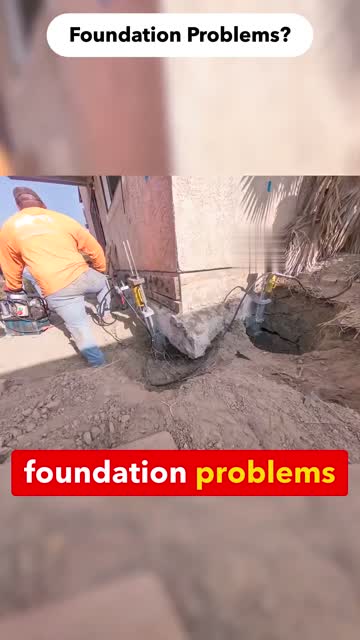
  4. Write top text. Pick a short line from the bank matching the visible problem. Foundation control: “Foundation Problems?” A white rounded banner with dark bold type remains through the clip. Do not invent prices, guarantees, discounts or an offer the receiving client cannot honor.
  5. Author caption cards. Split approved words into 2–3 word groups at natural phrase breaks; 1-word cards are allowed for long terms. Commas/full stops generally become ellipses; preserve question/exclamation marks. Supplied cards already match A/B/C. For new audio, compare each word with its timing, not just the total count.
  6. Render. The tool adds the treated WAV, draws the top banner, and burns white text on red cards with the active word’s text yellow (#FFD400). Font starts at 5.7% of frame height and shrinks long cards to fit 94% width. It uses the corrected end-exclusive caption timing to prevent two cards occupying a boundary frame.
  7. Place captions per clip. Caption-y is a fraction of full height: 0.68 is 68% down. Choose dead space away from the actual drill, jack or crack. For padded landscape video, put the card in the padding. Past FR edits put cards over blur seams where that also preserved action. Never hide the mechanism just to hide a seam.
  8. Save proof. Watch the exported file at full speed with headphones, then muted. Frame-step across each card transition and cuts, including the first/last frame. Save QA and the manifest; a successful encoder is not a visual pass.
.\.venv\Scripts\python.exe tools\build_video.py --video "work\base.mp4" --audio "audio\option-b.wav" --cards "audio\option-b.cards.json" --words "audio\option-b.words.srt" --banner "Foundation Problems?" --font "C:\Windows\Fonts\arialbd.ttf" --caption-y 0.68 --out "outputs\FR-practice-b.mp4"

The renderer adds a .build.json receipt and performs a full decode. It makes no network calls or live changes. You must still review timing, crop, offer, source marks and realism. It refuses to overwrite an existing output; use a new revision name when fixing a render.

CheckPass conditionIf it fails
Playback / fileH.264 + AAC, 1080×1920, 30 fps, full narration, no truncated tail.Re-export; keep exact audio duration.
Word clockNo drift, missed words or “live” substituted for “lift.”Correct words/timing from the script and treated WAV; rerender.
Caption boundariesOnly one card at each boundary; spoken word turns yellow, without a yellow box.Frame-step before/on/after the boundary. Do not approve from one screenshot.
Repair visibilityMechanism visible throughout; no card covers the important work.Move caption-y or change source framing.
ProvenanceSource/permission evidence and real vs AI recorded.Resolve before paid use; cleaning alone is insufficient.
Platform wrapperNiche, geography, offer, headline, CTA, destination and receiving client agree.Correct before delivery; do not assume historical Messenger settings equal current lead-form settings.

Make the silent base without a timeline editor

For a single continuous approved shot, the included helper preserves the full frame, pads to portrait and retimes it to the supplied audio. It does not loop or invent frames. Save the clean clip as inputs/source.mp4; create work and outputs folders. This is a practice route; inspect movement and padding before using it in a paid test.

.\.venv\Scripts\python.exe tools\prepare_base.py --video "inputs\source.mp4" --audio "audio\option-b.wav" --out "work\base.mp4"

Then run the caption/banner command above. The helper stops if matching the audio would require speed outside 0.5–4×. Select another range or assemble more shots rather than forcing an unnatural result. White padding is the portable default; an existing source with blur padding keeps that source appearance.

When a manual editor is useful

Use it to select shots, trim, change speed, preserve landscape framing, adjust audio gaps and inspect transitions. Use our renderer for the exact small cards and word highlight. Existing finished masters already have their captions; reuse intact as controls. Re-voicing a master with burned text requires matching the original words and timing or rebuilding from clean footage—otherwise it becomes contradictory.

F
Learn from the actual sessions and hand over a testable pack.Recovered history, corrections and the next concrete actions.
reference only
Past sessionWhat happenedRule for the builder
August 13 · 5ea6bd46…Recovered full-resolution winners on Drive. Tested Descript, then built local karaoke at Akash’s request.Finished masters are a separate library. Local renderer is the production path. Karaoke itself was a requested style change, not independently proven to lift conversion.
August 13 · 5ea6bd46…Akash rejected yellow boxes and obstructed repair action; positions were set per clip. Deep slow motion produced artifacts.Yellow text only. Inspect each frame region. Avoid drastic retiming.
August 13 · 0ba3e713… / 9aced236…A single shared timestamp drew two cards on one frame. A transcript misheard “lift” as “live.”Use end-exclusive intervals and script-authored words. Frame-step transitions.
August 26 · b55cb026…Reviewed 104 Firm Foundation reels + 25 symptom clips; generated eight gap-filling shots and seven follow-up shots.Audit coverage first. Describe competitor scenes in words; use own generated stills for references.
August 26 · b55cb026…Groundworks 476 video entries deduplicated to 55 unique creatives. Fixed-camera symptom/result structure inspired prototypes.Version counts are reuse signals, not verified budgets or paid results. Earlier session wording overstated this.
August 25–26 saved pack manifestsShort A/B/C Eric reads were combined with real, AI and hybrid footage.Reuse locked files. Built/approved/uploaded/delivered/qualified are separate statuses.
September 8 · 6441e2a0…Builder playbook identified unresolved destination and broad pack-format assumptions.Do not transplant B2B package formulas or old Messenger settings into a new B2C launch.
Source discipline: 27 matching local session transcript files were searched; process evidence was extracted from 16 relevant sessions. These are historical messages, cross-checked against current render helpers and saved packs. Old permission statements, campaign status, budgets and business offers are not current authorization. The old $10.59 vs $19.62 format comparison appears in session summaries, but its underlying row-level export was not recovered in this audit; treat it as historical reported learning, not fresh verified measurement. A synthetic prototype also contained “or you don’t pay” wording; that is not the foundation homeowner offer and is excluded here.

Next actions, with one owner per handoff

Order / ownerActionPass condition
1 · AkashProvide this guide and confirm Drive + Higgsfield access.Builder can open one clean FR clip and one finished control. No passwords in this public kit.
2 · BuilderInstall tools; reproduce Audio B with the supplied timing and render one practice cut.Complete MP4 plus QA receipt; compare full playback with real-b below. Font substitution acknowledged.
3 · BuilderAudit current qualified outcomes and propose a footage-only test using the existing three B videos.Three files, same words/offer, named market/client and one clear hypothesis.
4 · BuilderDeliver the exact MP4s, review page, source registry, script/WAV/cards/word clock, manifests and QA.Another person can reproduce the files; no broken local-only links.
5 · Campaign operatorCheck current destination, client intake, allowed budget and activation authority; create/review the intended roster.Exact ads and routing verified before spend; outbound tests only to an authorized test recipient.
6 · Builder + campaign operatorReview after the agreed window; keep lead quality and attribution consistent.Record keep/revise/stop with actual qualified outcomes. Build the next pack around one unresolved variable.

First pack recommendation: start with the existing real / lift / symptom Audio B foundation variants for Pittsburgh, if current lead quality and client availability support it. Dallas’s lower observed-cost Audio A is a separate market starting point. These are small-sample suggestions, not declared winners. Do not generate another large matrix before learning from the existing files.

Beyond foundation repair: the same audit → source → audio → overlay → QA loop serves concrete leveling, crawl space, waterproofing and flatwork. Change the symptom, repair mechanism and offer to the niche. Their library links and copybank rows are above; foundation examples below teach the mechanics.

01
Start with the repair footage that already earned inquiries.The business goal, the evidence and the next experiment.
reference only
THE GOAL

More qualified inspection requests

These ads reach homeowners with foundation problems and invite them to request a free inspection.

WHAT WE KNOW

Real repair action works

The FR-013 source has a saved record of 16 qualified inquiries at $12.10 each. Shorter versions and two AI concepts have also produced Meta-reported leads.

THE NEXT QUESTION

Which footage earns better leads?

Compare real repair work, an AI lift story and an AI symptom-to-fix story. Keep the text, audio, offer and destination fixed.

★ Suggested foundation pack: three existing Audio B videos for a Pittsburgh footage comparison. All three B versions have reported leads there. This is a provisional test choice, not a declared winner. Confirm lead quality and a current receiving client before spending. If Dallas is the selected market, Audio A is its lower observed-cost starting point.
02
Watch the complete ads. Switch the audio.Three footage concepts × three audio versions = nine full video previews.
reference only
Qualified history belongs to the source. The newer numbers below are Meta-reported leads, not verified qualified homeowners.
Use Play and turn up the player volume. Each preview includes the full footage, spoken audio, top banner and burned captions—not a thumbnail or an excerpt. Playing a new clip pauses the other clips.
03
See the six pieces inside one finished ad.A simple map from raw job footage to the homeowner’s next step.
reference only
Foundation Problems banner above real pier repair footage and red captions with the active word in yellow
1 · Footage / b-roll

The moving job video: a crew, soil, foundation and pier hardware. This carries the visual evidence.

2 · TOS = text on screen

Foundation Problems? A short, persistent banner tells homeowners what this is about.

3 · Spoken audio

Eric’s voice reads the script. Audio B explains fixing the problem without replacement and offers an inspection.

4 · Captions

foundation problems The words follow the audio. White text, red card, active word yellow.

5 · Offer / platform headline

Free Foundation Inspections. This is the offer used outside the video in the Facebook ad. A video preview alone does not show Meta’s full ad wrapper.

6 · Destination / follow-up

The recent tests used a lead form. After submission, the homeowner must reach the right intake and client. The destination is part of test quality, even though it is not burned into the video.

04
Hear the scripts and compare their results.Same real footage in Dallas; three different reads.
reference only
AUDIO A

Fast free inspection

If you have foundation problems, send us a message. We'll come out and get you a free inspection right away.
$16.27 per reported lead · Dallas

6 leads / $97.59 spent

AUDIO B

Avoid replacement

We fix foundation problems without the cost or mess of replacement. If you want a free inspection, click below to text us.
$18.66 per reported lead · Dallas

12 leads / $223.93 spent

AUDIO C

Problem + pictures

If you're tired of foundation problems, we can fix them without the cost or mess of replacement—click below to text us pictures and we'll get you set up with a free inspection right away.
$21.16 per reported lead · Dallas

16 leads / $338.56 spent

What this tells us: A has the lowest observed cost; C has the most leads and spend. Meta allocated spend unevenly. These samples do not establish a statistically certain or qualified-lead winner. Audio auditions also compared Eric with Adam, Michael, Fenrir, Onyx and Qwen voices; those were listening tests. No music-track winner was found.
05
Watch the six sources with qualified-inquiry history.The established reference set—not results earned by every later re-edit.
reference only
Different measurement: these are saved qualified-inquiry figures through the August 25 selection record. They are not the live Meta lead figures in the sections above. Previews are the matching earlier pack edits; source-level results can include multiple deployed instances. Two finished masters retain their original voices and captions.
FR-013 · REAL FOOTAGE

16 qualified · $12.10 each

Source spend: $193.67. Saved ranking: August 25. Preview: Foundation Sinking?.

Which elements does this use?
  • Voice: Eric (Kokoro) + 1.06x tempo + pause recut
  • Captions: karaoke 2-3 word red cards, spoken word in yellow text
  • Footage: real footage (harvested)
FR-011 · REAL FOOTAGE

5 qualified · $31.72 each

Source spend: $158.60. Saved ranking: August 25. Preview: Foundation Sinking?.

Which elements does this use?
  • Voice: Eric (Kokoro) + 1.06x tempo + pause recut
  • Captions: karaoke 2-3 word red cards, spoken word in yellow text
  • Footage: real footage (harvested)
AI-FR-07-pilot · AI FOOTAGE

4 qualified · $36.74 each

Source spend: $146.97. Saved ranking: August 25. Preview: Foundation Cracks?.

Which elements does this use?
  • Voice: Eric (Kokoro) + 1.06x tempo + pause recut
  • Captions: karaoke 2-3 word red cards, spoken word in yellow text
  • Footage: AI-generated
PROVEN-FR32 · REAL FOOTAGE

4 qualified · $21.98 each

Source spend: $87.92. Saved ranking: August 25. Preview: Wall-Crack Close-Up (burned).

Which elements does this use?
  • Voice: original master audio (untouched)
  • Captions: original burned captions (red cards, yellow spoken word)
  • Footage: real footage (proven master)
FR-021 · REAL FOOTAGE

2 qualified · $18.93 each

Source spend: $37.85. Saved ranking: August 25. Preview: Is Your Home Settling?.

Which elements does this use?
  • Voice: Eric (Kokoro) + 1.06x tempo + pause recut
  • Captions: karaoke 2-3 word red cards, spoken word in yellow text
  • Footage: real footage (harvested)
PROVEN-FR34 · REAL FOOTAGE

2 qualified · $28.69 each

Source spend: $57.37. Saved ranking: August 25. Preview: Exterior Dig + Gauge (burned).

Which elements does this use?
  • Voice: original master audio (untouched)
  • Captions: original burned captions (red cards, yellow spoken word)
  • Footage: real footage (proven master)
06
Know what is already on the shelf.Foundation repair has enough material for the next small test.
reference only
26approved foundation clips present
20 + 6real + AI approved clips
11finished foundation masters on Drive
104 + 25research reels + reviewed symptom clips
Library layerWhat existsUse it for
Approved raw/clean clips32 registered foundation entries; 26 approvedSelect visible repair actions and check provenance.
Finished recent packs3 real Audio A/B/C edits; 18 AI-matrix edits; 9 hybrids; 6 Arbuckle AI editsReuse existing renders. Counts overlap; they are not a unique total.
TOS bank10 foundation lines; 5 currently marked matched in the bankFoundation Cracks? · Sagging Floors? · Foundation Sinking? · Is Your Home Settling?
Recent broad TOS controlFoundation Problems?Held fixed in the short-audio tests shown above.
Research inbox104 source-owned reels, paid-ad approval N; 25 symptom clips reviewedLearn shot ideas. Do not silently treat research footage as cleared ad footage.
Where the assets live: generic-broll-library → ready-for-tos/foundation-repair → ready-to-deploy. Finished masters also live in Drive’s “Proven B2C Ads by Niche / Foundation Repair.” Approval and licensing are separate fields; some historically approved real clips have no license record.
07
Follow the existing production rules.Four skills cover footage, AI, voice/captions and launch checks.
reference only
1 · Select & cleanRemove source branding and audio. Re-scan. Pair visible repair with its banner.broll-tos-pipeline
2 · Build the readUse the niche’s real inspection offer. Treat Eric’s voice; align captions from the script.b2c-creative-production
3 · Review the videoWatch full playback. Keep repair action visible. Check timing, realism and provenance.AI additions: ai-creative-loop
4 · Prepare the testFreeze the roster. Create paused ads. Prove the destination and intake before activation.meta-creative-preflight
ElementKeepAvoid
FootageReal crew/mechanism/installed repair evidence; generic AI marked illustrativeClaiming an AI job or measured result is real client proof.
Top bannerShort, legible and matched to the visualA symptom promise that the footage does not support.
VoiceEric; 1.06× tempo and measured pause treatment; test-specific timingRaw TTS, a new voice and new words added to a footage-only test.
CaptionsScript-authored words, timed to the final audio; red/white/yellowTranscription errors or captions covering the repair.
Dimensions & pacing1080×1920 output; preserve the full repair payoffRejecting effective footage just for low source resolution.
OfferFree Foundation InspectionsSwitching foundation inspection to a generic estimate offer.
AI productionContext → intervention → mechanism → installed proof; stable hardware; blind realism reviewMorphing hardware or physical changes that make no sense.
LaunchReview sheet and build from one manifest; paused objects; central launch controllerChanging spent creatives in place or reusing a stale activation receipt.
The ~12–13-second original read and newer ~6–9-second scripts are distinct tests. Preserve each control’s existing timing. The standard short-loop speed guidance is 0.5×–4×; special 5× hybrid experiments are not a new default.
08
Build the next foundation pack from these three videos.Freeze the words. Change only the footage.
reference only
VideoVoice/scriptTop bannerPittsburgh evidenceBuild status
Real crew + pier repairAudio BFoundation Problems?2 reported leads / $30.99Existing file — no generation required
AI lift storyAudio BFoundation Problems?1 reported leads / $12.22Existing file — no generation required
AI symptom → fixAudio BFoundation Problems?3 reported leads / $47.70Existing file — no generation required
★ Default: real footage as the control, AI lift-story and AI symptom/fix as challengers; Audio B on all three. This is a follow-up footage test, not a claim that B beat A in Dallas.
01

Confirm lead quality

Join the saved ad IDs to qualified inquiries, inspection bookings and accepted clients. Database reads timed out in this audit.

Execution owner: next production session
02

Review three full renders

Watch the exact files with sound. Confirm visible repair, caption timing, offer and source labels.

Review owner: Akash · 3–5 minutes
03

Freeze one market

Confirm the current buyer, intake, lead form and follow-up. Hold them identical across the three ads.

Execution owner: launch session
04

Set the test cap

Agree the spend cap and stopping rule, then use the normal paused-build and activation checks.

Spend authorization: Akash
Next production after that: make new footage only when the current comparison names a gap. Keep new TOS, new voice and hybrid pacing for separate tests, so the result is interpretable. No campaigns, budgets or approvals were changed to create this report.
09
Check the evidence and its limits.Sources, complete numbers and what remains unverified.
reference only
MarketFootageAudioSpendMeta leadsCost/lead
DallasReal FR-013A$97.596$16.27
DallasReal FR-013B$223.9312$18.66
DallasReal FR-013C$338.5616$21.16
PittsburghReal FR-013A$6.440
PittsburghReal FR-013B$30.992$15.50
PittsburghReal FR-013C$113.503$37.83
PittsburghAI lift storyA$4.290
PittsburghAI lift storyB$12.221$12.22
PittsburghAI lift storyC$21.232$10.62
PittsburghAI symptom/fixA$1.600
PittsburghAI symptom/fixB$47.703$15.90
PittsburghAI symptom/fixC$0.930
  • Live Meta data was pulled September 9 for August 25–September 8, 2026 inclusive, from the Foundation Repair account. One “lead” action is counted, not duplicate grouped aliases.
  • Historical qualified counts are from the saved August 25 source selection. Newer qualified status and current client availability were not refreshed because database queries timed out.
  • These are observed campaign results, not a randomized study. Do not compare Dallas and Pittsburgh as if only creative changed.
  • Local manifests sometimes still say “pending upload.” Actual Meta spend proves that the nine Pittsburgh variants and three Dallas variants received delivery; stale local labels do not override that evidence.
  • The embedded files are full local source renders with H.264 video and AAC audio. Main audio players are exact extracts from the corresponding real-footage render.